Things to ask your agent
Besides the monthly run, your coding agent can do most other jobs in your books. You can ask it in your own words in the terminal, from your books folder:
cd ~/my-booksclaude # or codex, or piMost of these jobs also have a button in the app. Clicking the button opens your agent in a terminal with the request already typed in, so you get the same result either way.
Before the agent changes anything, it replies with a plan and waits for you to say yes. For a run, it also asks all its questions in one round, as in your first run.
| What you want | You can say | The button in the app |
|---|---|---|
| Do your books from new statements | “Do my books from the statements in ~/Downloads/nov” | Update › Add N files to my books |
| Finish what’s left in Review | “Finish what’s left in Review” | Review › Fix these |
| Record cash, deposits, investments and loans | “Fill in what I own and owe” | Settings › Opening balances › Fill in what you own and owe |
| Change your categories | “Move Rent under Housing, and merge Cafés into Dining Out” | Accounts › Reorganize my chart |
| Find why a balance stopped matching | “My HDFC balance in the books no longer matches the statement” | Reconciliation Differences › Find why this stopped matching |
| Categorize a payee the same way every time | “Always put SWIGGY under Food Delivery” | - |
| Add what’s ready to your books | “Add the ready accounts to my books” | Review › Add N entries from M accounts to my books |
| Ask about your money | “How much did we spend on the kids’ activities since April?” | - |
| Get a new report | “Make a report of what each of my cards cost me in fees each month” | Reports › Create a report |
Finish what’s left in Review
Section titled “Finish what’s left in Review”If transactions in Review still need an account, look like duplicates or fail a balance check, the agent can settle them. It starts from what is already in Review, shows you its plan, asks you about what it can’t settle in one round, and ends with the same report as a run from new statements. Clicking Fix these on an account’s page on Review limits the run to that account.
Record cash, deposits, investments and loans
Section titled “Record cash, deposits, investments and loans”Cash, fixed deposits, investments and loans usually have no statements you can import. Your net worth includes them only once each has an opening balance, which is what it held, or what you owed, on the day your books start. The agent asks you for these balances during your first run, and you can also ask it later to fill in what you own and owe, when it asks you for each balance in a single list:
Cash, deposits and loans have no statement, so their balance iswhat you held or owed on 2026-09-30, the day your books start 1 Cash in hand held amount? 2 Fixed deposits held amount? 3 Car loan owed amount? 4 Anything else you hold or owe: its name, held or owed, and the amountYou can answer 1 8000 3 250000 and skip the rest, because the agent records
only the amounts you give it.
Change your categories
Section titled “Change your categories”Your categories are the accounts in your chart of accounts. The agent can rename, move, merge or split them, and it moves the transactions in your books and in Review with them. It shows you each change and the transactions it will move before it makes the changes.
Find why a balance stopped matching
Section titled “Find why a balance stopped matching”Each statement balance in your books is a balance check. If a check that used to pass now fails, for example because a transaction was edited or added by hand, Reconciliation Differences lists it. The agent finds the transactions that changed the balance and proposes a fix. It asks you before it changes any transaction already in your books.
Categorize a payee the same way every time
Section titled “Categorize a payee the same way every time”When you tell the agent where a payee belongs, it writes a rule for that payee. The rule applies to the transactions in Review now and to every future import, so you are not asked about that payee again. Categorization describes where the rules are kept.
Add what’s ready to your books
Section titled “Add what’s ready to your books”By default, you add transactions to your books yourself on Review, so the agent doesn’t add anything unless you ask. When you ask, it adds the accounts that are ready, just as Add N entries from M accounts to my books on Review does, and tells you what it added, what it left and why.
Ask about your money
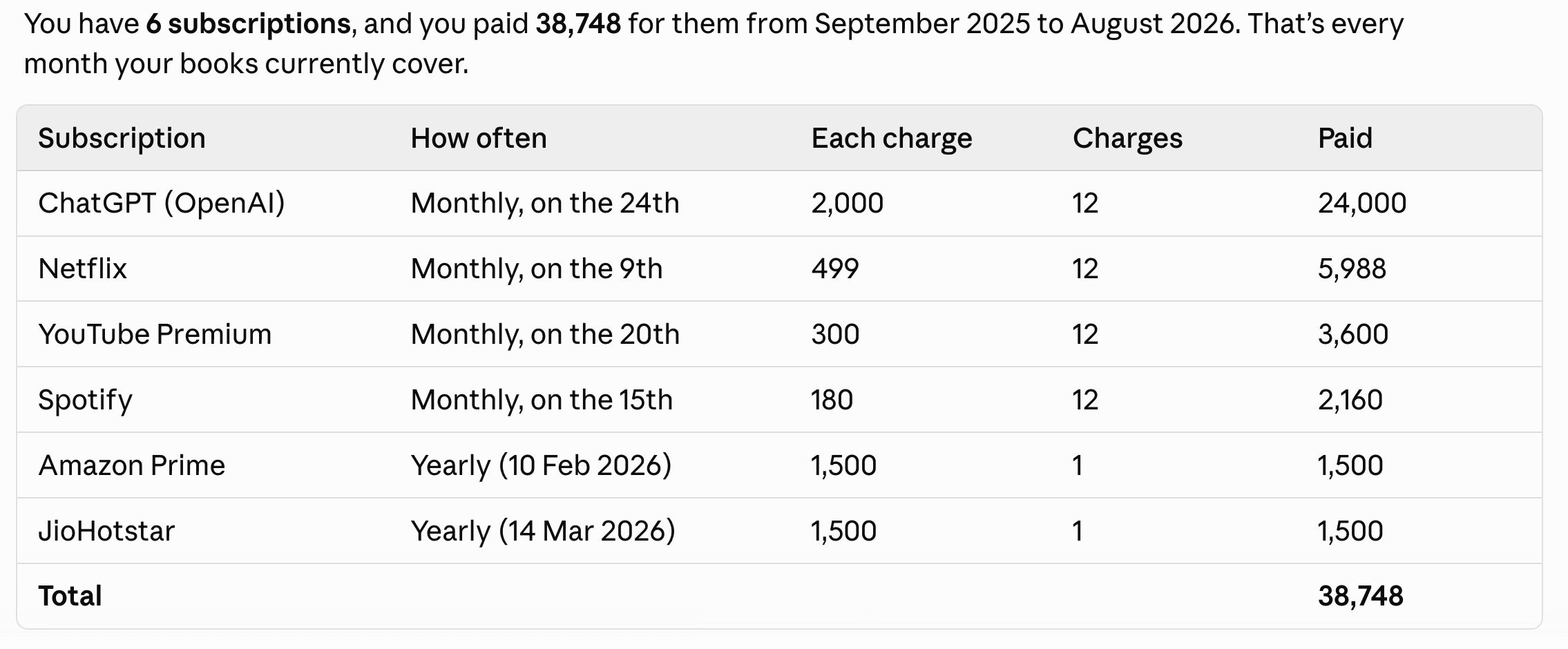
Section titled “Ask about your money”The agent can read your books and answer questions in plain language, including the figures it used. For example, you can ask, “List all my recurring subscriptions and how much I’ve paid for them”:
You can also ask a question that needs some working out, such as “We’re looking at a 2BHK in Bengaluru for about 90 lakh. Can we afford it? And if not, what could we afford, and when?”:
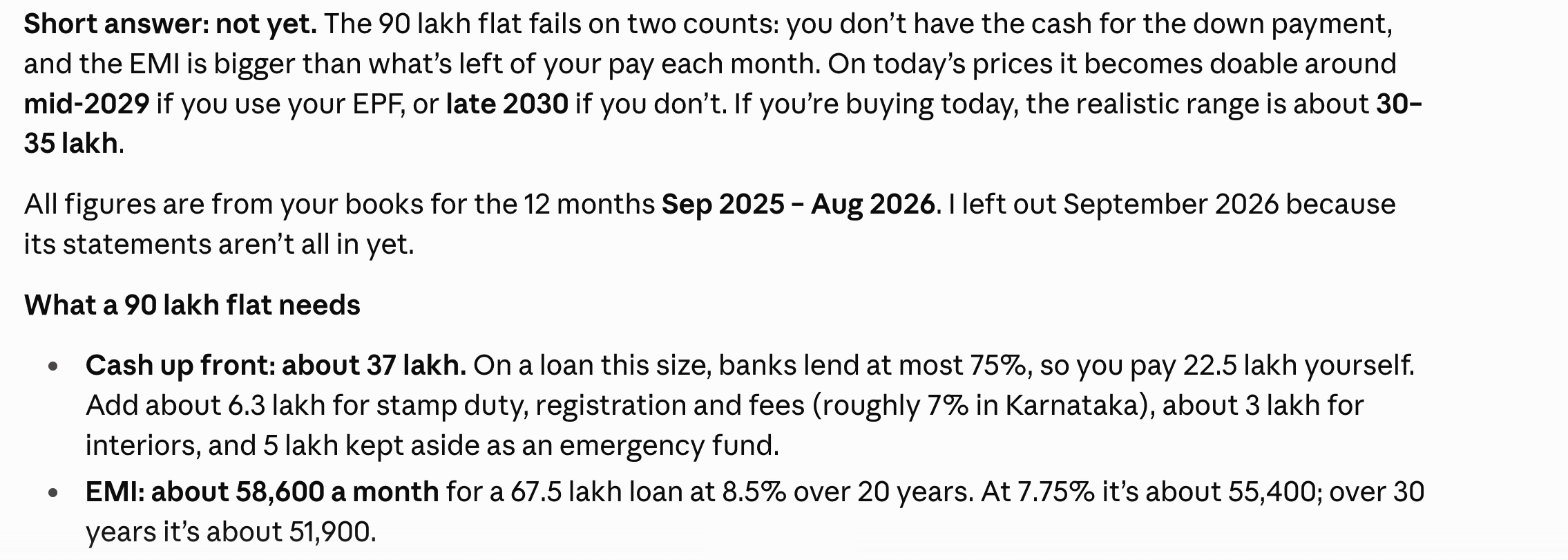
To answer a question, the agent only reads your books without changing anything.
Get a new report
Section titled “Get a new report”If you want to see something regularly, you can ask the agent for a report. It
writes the report in your books folder’s reports/ folder, and dbu6 lists it
on the Reports page under “Your reports”
(Reports).